What a Controller Button Can Teach Your Hands
The NES pad and Atari joystick taught different kinds of movement through their layouts. Their contrast shows how button placement can turn game rules into habits—and why a familiar arrangement still needs room for different hands.
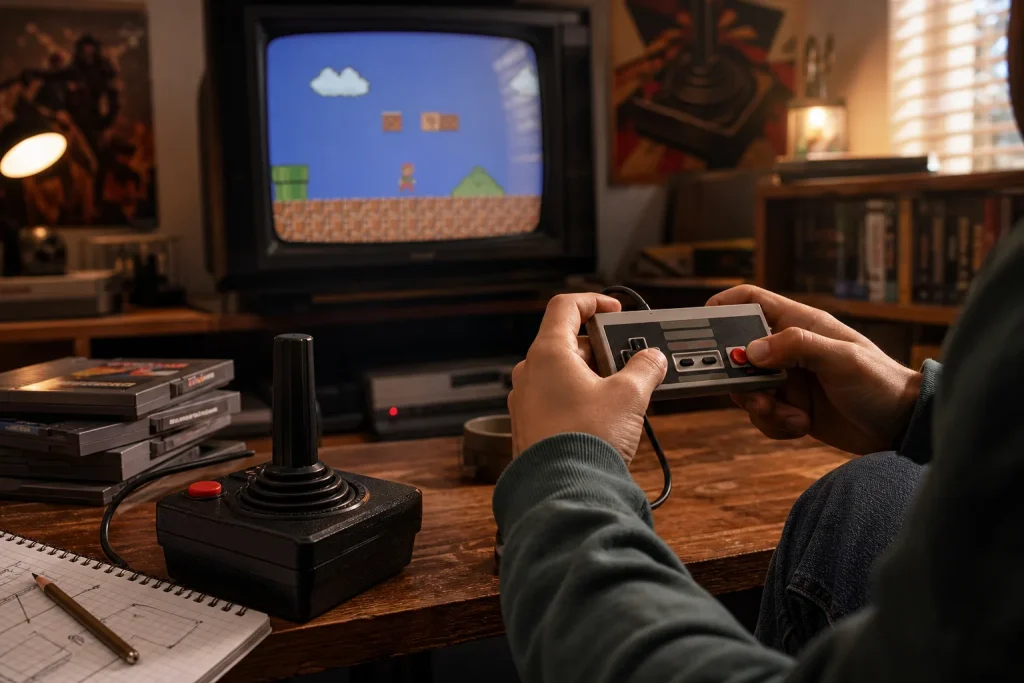
The easiest controller mistake is to treat buttons as interchangeable keys. That can make a game feel awkward: a player has to remember where an action lives instead of learning how it fits into play. Classic controllers make the cost of that choice visible. The NES pad asked one thumb to move between direction and two face buttons; an Atari joystick gave movement its own lever and left a separate button for an action.
The NES pad and Atari joystick taught different hand habits
The Nintendo Entertainment System controller’s cross-shaped directional pad sits beside two face buttons, A and B. A player can hold the flat controller in both hands and move a thumb between changing direction and pressing an action. That compact arrangement makes movement and button presses part of one continuous thumb routine.
The Atari joystick separates those jobs more visibly. The hand grips a stick to steer, while a button is pressed independently. Instead of sliding one thumb across a flat surface, the player directs the stick and activates the button with distinct movements. The contrast is not just a matter of appearance: each layout makes a different physical sequence the ordinary way to play.
Neither arrangement teaches every game equally well. A game built around frequent directional changes and quick face-button actions can make the NES pad’s compact reach feel useful. A game with joystick steering and a distinct action can make the Atari layout’s separation feel clear. The important question is not which controller is universally better, but what movement the game asks the player to repeat.
Position can turn a rule into a finger habit
At first, a player may look down to match a prompt to a button. With repetition, attention shifts back to the screen: fingers travel to familiar places without translating every instruction into words. Position is one part of that learning, alongside size, spacing, resistance and the grip the controller encourages.
Grouping actions can also suggest a relationship. If attack and jump sit close together, a player may be more inclined to try them in quick succession. The closeness does not explain the game’s rules by itself, but it makes the combination physically easy to attempt. Place the actions far apart and the same sequence may require a longer reach or a shift in grip.
Imagine a designer has a platform game with a jump button and a short-range attack button. In this invented situation, the starting layout puts jump under a comfortable thumb position and attack at the far edge of the controller. The designer moves attack beside jump, then gives the player a quiet opening area with no immediate danger. The player can try both actions without looking away from the character; the observable result to watch for is whether the combination becomes easier to attempt, not whether every player adopts it. If the reach still feels awkward, the designer can offer remapping rather than treating the arrangement as universal.
Feedback and consistency help confirm an input
A button that travels, clicks or changes resistance gives the finger a clue that a press happened, even while the player’s eyes stay on the game. If two controls feel almost identical, position and memory do more of the work. An on-screen response, such as a clear jump animation, adds another confirmation.
Physical feel can suggest the character of an action without dictating it. A crisp press may seem suited to a quick response; a longer-moving trigger may feel more deliberate. These are cues, not rules. The game’s response needs to make the actual behaviour clear, especially if a control has a different function in a menu or another context.
Consistency reduces relearning. If the same button performs the same kind of action in play and menus, a familiar movement is less likely to produce a surprise. When a contextual change is useful, clear prompts can prepare the player before the press.
Familiar layouts still need to accommodate different hands
There is no universally natural layout. Hand size, mobility, strength and previous controller habits all change what feels reachable. The thumb movement that seems short to one player may be uncomfortable for another. A familiar convention can help someone returning to a genre, but it can confuse a newcomer if the game gives no clear explanation.
Remapping lets players put important actions within their own comfortable reach. Other useful options include adjusting stick sensitivity, supporting another input device, or avoiding combinations that demand one finger hold a button while repeatedly tapping another. Clear prompts and an early, low-pressure chance to practise help players understand the intended controls before the game asks for speed.
When a layout is being revised, check the physical and on-screen cues together:
- Check whether the main action is reachable without shifting the grip; if it is, keep the placement, and if not, move it or offer remapping.
- Check whether two frequently paired actions sit within a comfortable thumb movement; if they do, retain the grouping, and if not, bring them closer or let players reassign them.
- Check whether neighbouring buttons can be distinguished by touch; if they can, keep their feel, and if not, adjust spacing or tactile differences.
- Check whether a press produces a clear response on screen; if it does, keep that cue, and if not, make the animation or prompt more legible.
- Check whether a player must hold one control while tapping another; if the grip remains comfortable, keep the combination, and if not, change the input or provide an alternative.
- Check whether the same button changes function between play and menus; if the change is clear, retain it, and if not, add a prompt or use a consistent action.
A controller teaches through repeated movement: where a thumb rests, how far it travels, what it feels, and what the screen does in response. The NES pad and Atari joystick show that a layout can make particular movements feel ordinary without making them inevitable. A useful design gives the intended action a clear physical path, then leaves players room to choose a different one.